博文

目前显示的是标签为“Mini-PC”的博文

#Report#How to Protect Your PC From Remote Attacks

图片
A few days back, several users experienced, what must have seemed like a scene straight out of a horror flick, their PCs automatically opening several windows, browser tabs & mouse pointer swerving across the screen trying to log in to Paypal. If you are having a professional edition of Windows 8/8.1/10 you can use Bitlocker for the purpose while other users can choose from plenty of third party apps available. Some of the top ones of my head are AxCrpyt, Veracrypt & Symantec Endpoint Encryption. Well if you also experienced something similar to this, don’t panic, no spirit possessed your PC. Chances are you might be a TeamViewer user and one of the several affected ones due to widespread hacking of TeamViewer accounts. Majority of the users reported few days ago but some users also claimed experiencing such an attack as far as six months back. But even after the numerous reports, TeamViewer was adamant on not admitting it got hacked and instead blamed user’s po...
#Report#Future Windows 10 phones could run full-fledged PC programs

图片
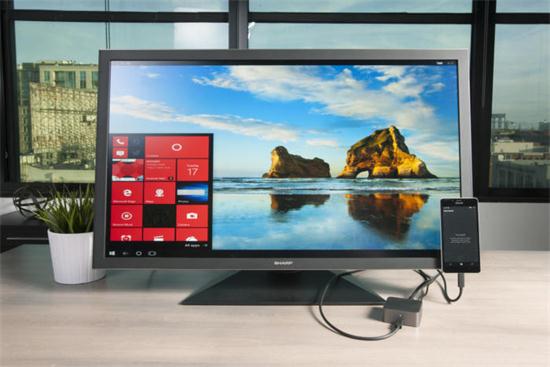
When the HP Elite x3 launched earlier this year, we lamented its likely legacy as the last great Windows 10 phone. It stood alone as the embodiment of Microsoft’s PC-as-phone vision at a time when Microsoft was ruthlessly burning its mobile hardware division to the ground and gutting what few Nokia remnants lingered. But now it appears that the HP Elite x3’s highlight feature—the ability to run PC software on a phone—may actually find its way into Windows 10 Mobile’s core at some point in the future. Frequent Windows sleuth WalkingCat dredged up hints of Windows 10's ability to emulate x86 (read: PC) software on ARM (read: mobile) processors, via a “CHPE” designation in code. Mary Jo Foley, a Windows reporter with impeccable sources, followed up on the report today. Foley says “CHPE” indeed refers to Microsoft plans to introduce x86 emulation to Windows 10 in a “Redstone 3” update in fall 2017. The “C” stands for “Cobalt,” Microsoft’s code name for x86 emulation, accor...

#Report#How to download YouTube videos: 4 things you need to know

Sure, it's easy to download videos from YouTube, but doing it legally is another proposition. While there's no law that specifically says you can't download videos from YouTube for free, YouTube's rules are very clear. Before you start downloading YouTube videos, read on for four things you need to know, starting with... There's only one 100-percent legit way to download videos from YouTube If you want to download YouTube videos confident in the knowledge that you're on the right side of the law, there's just one way to do it: by signing up for YouTube Red. Among other benefits (including ad-free videos, original shows and unlimited music streaming), YouTube's $10-a-month Red subscription service lets you save any YouTube video for offline viewing. A couple of key restrictions apply when it comes to "offline" YouTube viewing. For starters, you can download YouTube videos only by using the YouTube app for Android and iOS. No PC or Mac ...

#report#How to test your home internet connection speed

Testing your internet connection’s performance is a straightforward exercise. You don’t need any extra software—all you need is a computer with a web browser. But there are also a few things you can do to make sure you are getting the most accurate reading of your internet connection. Here’s what to do. Get ready For best results, you want to use a wired connection if at all possible; that way, you don’t have to worry about interference and performance fluctuations that can occur while you’re on Wi-Fi. If you have any other wired devices on your home network, plug your test computer directly into the modem so those don’t interfere in your testing. If you’re stuck using Wi-Fi—say, you have a MacBook Air or a tablet or some other device that doesn’t have an ethernet port—do what you can to minimize interference. Make sure your Wi-Fi router is away from other electronic devices like cordless phones, and temporarily disconnect any other devices from your Wi-Fi network—after all, you...

#report#How to fix a dead key on your keyboard

One bad key on your keyboard can make it impossible to write even the simplest email. After all, without the N key, your kids might be stuck eating “afterschool sacks.” Here’s how to fix the problem. [Have a tech question? As Answer Line transitions from Lincoln Spector to Josh Norem, you can still send your query to answer@pcworld.com.] First, if your keyboard doesn’t have a separate number pad, check the Numlock key. If it’s on, it might rearrange some keys and make others unusable. Otherwise, there’s probably something below the bad key. You have to get it out. If it’s an external keyboard, turn it over and gently tap the back. If that doesn’t work, unwind a paperclip and try dislodging stuff from beneath the key. But don’t try either of these with a laptop’s built-in keyboard If neither of those worked, or if the problem is with your laptop’s built-in keyboard, use compressed air to blow out whatever is beneath the problem key. You can buy a can of compressed air for as l...

#report#7 ways to make the most of Google Keep for Android and iOS

Google Keep may not be the most robust note-taking app you’ll find on the Play Store, but for me, that’s a virtue rather than a drawback. When I need to make a grocery list or jot down a quick idea, I want to use something easy and fast, like a digital Post-It note for my phone. That’s Google Keep in a nutshell. Of course, just because Google Keep is relatively simple to use doesn’t mean it doesn’t have any tricks up its sleeves. Indeed, once you know what you’re doing, you can perform tricks like having your latest Keep notes appear on your Android or iOS home screen, or make your shopping list pop up the moment you arrive at the grocery store. You can also add narration to a doodle, color-code your notes, share a note with a friend, save selections from a webpage, and more. Put the Google Keep widget on your home screen One of the best ways to make the most of Google Keep is to install the Keep widget on your home screen. Once you do, you’ll be able to create new notes with a ...

#report#What to do when your laptop's touchpad stops working

When your laptop’s touchpad stops responding to your fingers, you’ve got a problem. Have you ever tried to use a Windows PC without a mouse, touchpad, or other pointing device? It’s all but impossible. If the problem just started, reboot your computer and see if that fixes it. (Yes, I know that’s painfully obvious, but we all sometimes overlook the obvious.) If that doesn’t work, try these solutions. First, make sure you haven’t accidentally disabled the touchpad. In all likelihood, there’s a key combination that will toggle the touchpad on and off. It usually involves holding down the Fn key (which is probably near the lower-left corner of the keyboard) while pressing another key. But what other key should you press? It’s probably one of the function keys (F1 through F12), although it might be something else. Examine the keyboard, paying particular attention to the little icons (usually blue) on some of the keys. Look for an icon that might suggest the touchpad. Unfortunately,...

Realan team building activities

图片
 In order to enhance team cohesion, to improve teamwork effectiveness and collective spirits, to strengthen team communication and information exchange, Realan organized an interesting departments activities on August 26th, the activities were divided into three departments, manufacturing center, oversea trade department and engineering department, the activities enhance the understanding between team, and let the group close to nature. Manufacturing center —— Relaxed and happy cultural activities   The activity of the manufacturing center was held in the company's conference room. At the beginning of the activity, the general manager Ms. Zhang, took the first speech, to thank all the members of the team, for the company's development efforts, “ I hope all of you work hard and play harder, I hope everyone can enjoy the fun and bring happy mood to each other, Healthy life, happy work! ” Ms.Zhang said.   Then the Director of Manufacturing center Miss Jiang a...

#Report#Microsoft: We're not killing MS Paint

The program will become available in the Windows Store Microsoft has confirmed that it won't be axing its venerable Paint application, after news that the software was being deprecated sparked a wave of outrage among devoted doodlers. The company yesterday published a list of software that is set to be either removed or deprecated with the forthcoming Windows 10 Fall Creators Update. The list included Outlook Express, the Reader app and, most notably, MS Paint. Paint, which has a 32-year legacy as part of Windows operating systems, is marked for deprecation, meaning that it is "not in active development and might be removed in future releases". However, many people took this to mean that Microsoft would be dumping the beloved app in favour of the newer Paint 3D software, introduced with the previous Creators Update. Fans of Microsoft's old-school art software took to the internet to protest its removal, sharing some of their best creations made using the ap...

Realan Mini PC barebone Mr.NUC-V6-i3H4010U

图片
Redefining the Desktop PC Challenging the essence of how we define a desktop PC , Shenzhen Realan have developed an ultra compact PC with a Build-in Intel core i3-4010U Dual core 1.7G. Ideal for a broad range of computing applications at home or in the office or in industry, this barebone Mr.NUC-V6-i3H4010U expounds sheer simplicity and convenience. Main advantages: Small size: the mini pc Mr.NUC-V6-i3H4010U just like the traditional HDD sized and can be mounted to the backside of monitor takes almost no space of your desk, make your desk more clear and spacious. Durability: this Mr.NUC-V6-i3H4010U fanless mini pc are highly intergrated, fanless design makes it runs silent and no need extra maintenance like traditional desk comptuters. the mini pc Mr.NUC-V6-i3H4010U using aluminium alloy pc case, durable and high heat dissipation. Low power: the mini pc Mr.NUC-V6-i3H4010U using 12V power supply, power consumption from 15W to 30W. Universal performance: mini pc Mr.NUC-...

Realan Mini PC barebone Mr.NUC-V7-J1900L

图片
Redefining the Desktop PC Challenging the essence of how we define a desktop PC , Shenzhen Realan have developed an ultra compact PC with a Build-in Intel Celeron J1900 Quad Core 2.0G. Ideal for a broad range of computing applications at home or in the office or in industry, this barebone Mr.NUC-V7-J1900L  expounds sheer simplicity and convenience. Mini pc main advantages: Small size: the mini pc Mr.NUC-V7-J1900L just like the traditional HDD sized and can be mounted to the backside of monitor takes almost no space of your desk, make your desk more clear and spacious. Durability: this mini barebone Mr.NUC-V7-J1900L fanless mini pc are highly intergrated, fanless design makes it runs silent and no need extra maintenance like traditional desk comptuters. the mini pc Mr.NUC-V7-J1900L using aluminium alloy pc case, durable and high heat dissipation. Low power: the mini pc Mr.NUC-V7-J1900L using 12V/5A power supply, power consumption from 15W to 30W. Universa...

Realan Mr.NUC-V6-BTJ1900V3U

图片
Redefining the Desktop PC Challenging the essence of how we define a desktop PC, Shenzhen Realan have developed an ultra compact PC with a Build-in Intel Celeron J1900 2.0G Turbo boost up to 2.41G. Ideal for a broad range of computing applications at home or in the office or in industry, this barebone Mr.NUC-V6-BTJ1900V3U expounds sheer simplicity and convenience. Main advantages: Small size: the mini pc Mr.NUC-V6-BTJ1900V3U just like the traditional HDD sized and can be mounted to the backside of monitor takes almost no space of your desk, make your desk more clear and spacious. Durability: this Mr.NUC-V6-BTJ1900V3U fanless mini pc are highly intergrated, fanless design makes it runs silent and no need extra maintenance like traditional desk comptuters. the mini pc Mr.NUC-V6-BTJ1900V3U using aluminium alloy pc case, durable and high heat dissipation. Low power: the mini pc Mr.NUC-V6-BTJ1900V3U using 12V power supply, power consumption from 15W to 30W. Univers...
图片
Small size, cool experience—talk about the application experience of Mini PC With the rapid development of computer, and continuous improvement of integration of the motherboard, CPU and GPU, Mini host with small volume has been accepted by most people. From the well-known traditional PC to ordinary Mini PC and to small size Mini PC, even the NUC with smaller size, the last three of them we referred to as Mini PC. With the development of technology, the volume of the Mini PC is becoming smaller and smaller, also it has gradually been recognized by many users and provided big convenience to them, and owned great progress   in the market of PC. We believe that the future of Mini PC will be better. There are so many advantages of Mini PC products. Firstly, it is with small size. The volume of Mini PC is almost the same as set-top boxes, even smaller. And due to the well-designed stylish appearance, it can be as a whole with other equipment in living room; it also can be used easi...